Trang

Thứ Sáu, 14 tháng 12, 2012

Why Microsoft redesigned Windows

New Windows chief Julie Larson-Green explains why the company felt the need to rethink the basic interface of its popular operating system.


New Windows chief Julie Larson-Green.
(Credit: Microsoft)
Windows 8 has its fans and foes, but Microsoft felt the time was ripe for a new look and feel for a product used by more than 1.2 billion people.
Julie Larson-Green, the new head of Windows product development, recently spoke with MIT Technology Review about the reasons behind the major changes in the latest version of Windows.
Touting the new Windows 8 Start screen, Larson-Green said that in the past Windows users worked at a desktop with a monitor. In her view, people typically launched one window, put it away, and then launched another window. But in Windows 8, all the apps and windows you might want to launch are visible through Live Tiles.
"Instead of having to find many little rocks to look underneath, you see a kind of dashboard of everything that's going on and everything you care about all at once," Larson-Green said. "It puts you closer to what you're trying to get done."

Sony Duo 11 Ultrabook review: Blurring the line between tablet and laptop


Unpacking the Sony Duo 11 (aka the SVD1123CXB) reveals what appears to be a tablet; no keyboard is immediately visible. Yet when you pick it up, it seems a little hefty for a tablet. What's going on here? Well, the Duo 11 is not just a tablet. Lifting up the top edge tilts the display and reveals a sliding keyboard hidden beneath the panel.
Welcome to the world of Windows 8 sliders. The Duo 11 keeps its keyboard tucked underneath the tablet's bottom chassis—it's there when you need it, but you can hide it away when you don't.

SONY
The Duo 11 modes

The Duo 11 weighs in at 2 pounds, 13 ounces, decidedly on the light side for an Ultrabook. The 11.6-inch screen offers a full 1920-by-1080-pixel IPS touchscreen panel that provides good image quality and color fidelity. Sony also built a full Wacom digitizer into the touchscreen, complete with a stylus supporting 256 levels of pressure sensitivity. Artists will appreciate the digitizer, but Sony didn't think to include a slot to store the stylus in the body of the unit, so you'll need to keep track of it as you travel.

Thứ Ba, 11 tháng 12, 2012

Picture of Nokia Lumia 620 in Vietnam


LUMIA-620-1-jpg[1186083644].jpg
Screen with ClearBlack technology for better viewing angles in the sun.
LUMIA-620-2-jpg[1186083644].jpg
The back cover of the machine made ​​from polycarbonate and have a variety of colors can be replaced.

Thứ Năm, 13 tháng 9, 2012

Laptops for Back-to-School: How to Make the Right Choice


Students have different budgets and needs. Picking the right laptop will save both money and frustration.

It’s back-to-school time, and retailers are inundating everyone with back-to-school specials, ads, email promos, and even direct-mail offers, all promising the best possible computer deal for your student. The problem is that many of these deals focus on some generic student, failing to address the needs or wants of individual students. Sure, the bargains often look attractive, but before you whip out your credit card, you should spend a little time with your student to figure out what they need.
College students, for example, don't have an easy time buying a computer for school. Budgets can be tight. Space is at a premium—particularly today, when colleges are cramming three bodies into rooms designed for just a pair of students. And computer needs may change due to class requirements.
That’s not to say that high school students don’t have their own needs. Nowadays, high school juniors and seniors face more-demanding curricula, with an increased homework load plus a growing need for collaboration and teamwork. They may have more space than college students, but not necessarily more budget.
Since today’s students are more mobile and more connected than ever, laptops are typically a better choice for students than desktop PCs. Students who require a larger display can always connect to one at their home desk.
My younger daughter, Emily, is heading off to college this year, and we just finished researching and buying a laptop. In addition to talking about technology and products, I’ll share some of our experiences and thought processes.

Before Buying: Research

Laptops for Back-to-School: How to Make the Right ChoiceMy college-bound daughter, Emily, liked the usability and design of the Dell XPS 14.First of all, PCWorld is an excellent tool for researching laptops. Our laptop reviews give you an edge, helping you zero in on the models you should consider. You can sort the reviews by price, size, brand, and other features.
Don’t forget to check with the college or university your child will be attending. Schools often have listings of deals from different manufacturers, including discounts that may not be readily visible on the manufacturers' websites.
Also check any specific requirements the university has for hardware, software, or accessories. While most colleges may be brand agnostic, a few support Apple or Windows exclusively. Other colleges restrict certain types of hardware, forbidding items such as routers or network-attached storage. You’ll want to know about such conditions before you buy anything.

Work Versus Play: A Reality Check

Sometimes it seems like the ideal laptop for a student weighs under 4 pounds, sports a 24-inch display, carries 5TB of storage, and has a 175W graphics processor. That’s an impossible mix, of course, so your first task is to talk with your student and do a reality check. Emily is a good example. She’s a pretty serious PC gamer; she likes playing MMOs and PC-based role-playing games that often demand serious graphics horsepower.
You need to impress on your student that a laptop for school should be optimized for the work, not the play. When we bought a school laptop for my older daughter, Elizabeth, we didn’t quite grasp this concept. She ended up with a 15.6-inch laptop that had a decent mobile GPU and a very nice screen—and weighed nearly 7 pounds. She came to dread lugging it around, even when she needed it for class. Next time around, she’ll get something lighter, as she has come to realize that she doesn’t really use her laptop for gaming; her most demanding application is photo editing. Classes change, and so do hobbies.
Laptops for Back-to-School: How to Make the Right ChoiceThe HP Envy 4 turned out to be a no-go because the touchpad buttons required a lot of force to press.
I told Emily that if gaming was truly important to her, she should consider making room for a desktop system of some kind. For a school computer, mobility was more important than the ability to run Mass Effect 3 at high detail levels, I said. On the other hand, she wasn’t willing to sacrifice usabilityfor sheer portability. (I’ll get to what that means shortly.)
She’s also a pretty good touch typist, so both keyboard and touchpad feel are important to her. Performance is a high priority, too—but when Emily talks about performance, she really means “responsiveness.” So although raw CPU or graphics horsepower may not be critical, having adequate memory to allow a lot of simultaneously open windows and browser tabs is pretty important.
Ask your student several questions: What types of classes are they taking? Will the emphasis be on math or writing, or will it be a blend of both? Online collaboration is more common now than in past years, so reliable networking capabilities and a good webcam are must-haves, too.
Let’s run down a list of key considerations.
  • Budget: Before you begin shopping, set your budget. That will narrow the choices substantially. Try not to set the budget too low. Newspaper ads are often full of $499 laptops, but those models tend to be bulky, with less-than-robust plastic shells. The sweet spot for performance and durability seems to be between $800 and $1200 these days. Spending more than that will get you nice luxuries, such as a large solid-state drive or a beefier CPU, but typically those aren't necessities.
  • Mobility: This term means different things to different students. Some people are willing to lug around 7 pounds of laptop all day long, but most aren’t. Remember to factor in the weight of the charger.
  • Battery life: A high-performance laptop will do little good if the battery dies after a couple of hours. You can’t always find wall power on the go.
  • Usability: A good keyboard and a usable touchpad are both important, but the feel is a personal choice. Some folks are willing to give up a little tactile feedback in the keyboard if it saves them a pound of weight.
  • Display: The most common LCD-panel resolution today is 1366 by 768. But if you can find a laptop with a good 1600-by-900-pixel screen or even a 1080p display, that machine becomes even more usable, particularly for Windows 7 and the upcoming Windows 8.
  • Mac versus PC: This is another personal choice. My older daughter might have been perfectly happy with Mac OS X, but Emily was adamant about getting a Windows-based system.
  • Storage: Since laptops are often a student’s only PC, adequate storage is essential. A 128GB SSD might be ideal for a business road warrior connected to corporate servers, but students will want their music, their photos, and even their games on the one system. Typically that means picking a laptop with a large hard drive over one with a smaller SSD.
  • Secondary storage: In addition to primary storage, your student will need backup storage. Although backing up to cloud services is an interesting option, having a portable, bus-powered hard drive is crucial.
  • Connectivity: If the laptop lacks an ethernet jack, as some ultraportable systems do these days, you’ll want a USB-to-ethernet adapter. While most universities now have Wi-Fi in most places, not all of them do. For example, Emily’s dorm rooms require a wired ethernet connection, even though Wi-Fi is available on the main campus.
  • Support: Springing for an extra warranty is worthwhile. First-year students in particular tend to bang up their laptops, spill coffee on them, lose them. Extra support services, such as an extended warranty that also covers accidental damage, can be indispensable. Many companies now also offer location tracking, such as Intel Anti-Theft technology, Lojack for Laptops, or Apple’s Find My Mac. A tracking feature could be a lifesaver if your student leaves the laptop in a coffee shop or if someone steals it.

Don't Sweat the Jargon

You'll find laptop ads full of terms like "turbo-boost," "3rd-generation Core processor," "400-nit brightness," and other jargon. Most PCWorld readers already understand a fair amount of this stuff, but you don't need to obsess over the raw spec details. In a mobile PC, usability, battery life, and ease of transport are much more important.

Apple announces iPhone 5


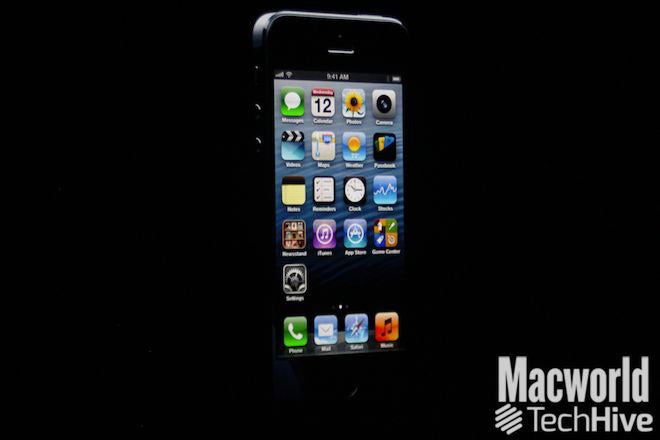
As was widely expected, Apple on Wednesday unveiled the iPhone 5, the newest entrant into its smartphone lineup. The iPhone 5 sports a taller screen, a new dock connector port, LTE support, and other refinements.
Phil Schiller, Apple’s senior vice president of worldwide marketing, took the wraps off the new iPhone for press gathered at the company’s San Francisco event, calling the device “the most beautiful product we’ve ever made, bar none.”
The iPhone 5 is made entirely of glass and aluminum, Schiller said, adding that the “exacting level of standards” exhibited by the phone is Apple’s best hardware engineering to date.
It’s the thinnest and lightest iPhone, at 7.6mm thin, and 112 grams. Schiller said those measurements make it the world’s thinnest smartphone. The iPhone 5 is also volumetrically smaller than the iPhone 4S.

The screen

The iPhone 5 keeps the Retina display moniker, but it’s taller than the screens on iPhones that preceded it. The display offers 326 pixels per inch, with a 4-inch screen and 1136 x 640 resolution.
There’s now a fifth row of icons on the taller home screen, and all of Apple’s native apps, along with the iWork and iLife suites, have been updated on the iPhone 5 to take advantage of the larger display.
The Calendar app in landscape shows five days instead of three on the iPhone 5, for example.
Apps that aren’t updated don’t stretch or scale, Schiller said. Rather, such apps will display letterboxed on the iPhone, with black borders surrounding the centered app.
Schiller showed off apps from CNN and OpenTable, each of which had been updated for the taller iPhone display, adding in new content. In OpenTable’s case, Schiller said, the developers added some of the iPad app’s interface element, since the iPhone 5’s 4-inch screen afforded more space for such niceties.
The iPhone 5 offers 44 percent more color saturation than the iPhone 4S, Schiller said, and because the touch sensors are integrated right into the display, it’s 30 percent thinner, with sharper imagery, and less glare in sunlight.

Ultrafast wireless

New to the iPhone 5 is LTE, HSPA+, and DC-HSDPA support. That’s on top of the GPRS, EDGE, EV-DO, and HSPA that the iPhone 4S offered. Schiller said that with LTE, the iPhone 5 can achieve a “theoretical maximum downlink of up to 100Mbps.”
Schiller explained that the iPhone 5 uses one baseband chip for voice and data and a single radio chip. The new phone also improves upon the iPhone 4S’s dynamic antenna, Schiller said, improving its ability to automatically switch to different networks as appropriate.
LTE partners for the iPhone 5 include Sprint, AT&T, and Verizon in the U.S, and Rogers, Fido, Bell, Telus, and more in Canada. Schiller said there are “plenty” of LTE partners in Asia, Australia, the UK, and Germany, with lots of DC-HSDPA support in Europe as well.
The iPhone 5 also gains better Wi-Fi, with support for 802.11 a/b/g/n. The 802.11n standard is 2.4GHz and dual channel 5GHz, up to 150 Mbps, Schiller said.

A6 processor

The processor in the iPhone 5 is the brand new Apple A6, which is twice as fast at CPU and graphics processing compared to the A5 that drove the iPhone 4S, Schiller said. It’s also 22 percent smaller than its predecessor, freeing up more space inside the iPhone, and making it more energy efficient to boot. Schiller said that everything—launching apps, viewing attachments, loading music—would be twice as fast as before.
Schiller invited EA to show off what the A6 chip meant for them; EA debuted Real Racing 3, which included real-time reflections, functional rear view mirrors, and “console quality” graphics, according to EA Studios’s Rob Murray. (The game will hit the App Store later this year.)

The battery

Schiller explained that Apple wanted “to match the battery life of the 4S in a thinner and lighter design” for the iPhone 5. The company ended up exceeding that battery life; the iPhone 5 will offer eight hours of 3G talk time and browsing and LTE browsing, ten hours of Wi-Fi browsing, ten hours of video, 40 hours of music, and 225 hours of standby time.

The camera

The iPhone 5’s camera sports an eight megapixel sensor, 3264 by 2448 pixel images. It’s backside illuminated, with a hybrid IR filter, five-element lens, and a fast f/2.4 aperture. And the camera is 25 percent smaller than the iPhone 4S’s camera. The camera also includes a dynamic low-light mode, which can sense low light and combine elements for two f-stops greater.
The camera also includes, for the first time on an iPhone, a sapphire lens cover, which Schiller said would protect the lens and make images cleaner and sharper.
The A6 chip includes a new image signal processor, with spatial noise reduction and filtering to improve photographs. And the camera’s now 40 percent faster, too.
Also new in the iPhone 5’s camera arsenal is Panorama. You hold the iPhone vertically and sweep your scene; the app tells you at what speed to move. “Even if you’re not perfectly stable,” or if movement artifacts are introduced, Schiller said, the software can compensate in the final image.
Video performance is improved, too. The iPhone 5 offers 1080p HD video, improved video stabilization, face detection for up to ten faces, and can take photos while you’re recording video. The front-facing camera is now a FaceTime HD 720p HD camera with backside illumination, a significant improvement over the iPhone 4S’s VGA-quality front-facing camera.

Audio

The iPhone 5 includes three separate microphones, Schiller said: One on the front, one on the back, and one on the bottom. They improve noise cancellation and voice recognition.
The speaker gets improved, too. It now includes five magnets in its transducer, with better frequency response and better sound—while being 20 percent smaller than the speaker in the iPhone 4S. The earpiece is now noise-canceling, too, Schiller said.
With some carriers, the iPhone 5 will support wideband audio. In a typical cell phone call, the frequency of data in your voice is compressed around the midrange, Schiler said. But that doesn’t sounded entirely natural. Wideband audio fills up more of the frequency spectrum to make your voice sound more normal. Schiller said 20 carriers will support the technology at launch, and didn’t mention any U.S. carriers that would.

Lightning: The new dock connector port

Throw away your old dock connector cables. Or, at least, go pick up some adapters. The iPhone 5 abandons the familiar 30-pin dock connector port, which first appeared with the original iPod in 2003. In its place is a smaller port, which Apple calls Lightning.
The 8-signal Lightning connector is all-digital, with an adaptive interface and improved durability. It’s reversible (meaning you can orient it either way, like a MagSafe adapter), and it’s 80 percent smaller than the connector it replaces.
Schiller announced that Apple would offer a 30-pin-to-Lightning connector, but didn’t mention pricing.
The iPhone 5 will come in an all black model, and a white model with a bright silver aluminum finish.
We’ll have more on the iPhone 5, including pricing and availability, later on Wednesday as that information becomes available.
Source : pcworl.com

Thứ Tư, 1 tháng 8, 2012

Intel Targets Low-price Laptops With Celeron Chip Refresh


Intel has started shipping four new Celeron chips intended for low-priced laptops as it gears up for the back-to-school shopping season.
The new dual-core Celeron 877 and 847 chips, based on the Sandy Bridge microarchitecture, are part of the same family of processors that appeared in low-priced laptops in the US$200 to $500 range during last year's holiday shopping season. The 877, in particular, will allow vendors to cut prices while boosting performance.
The new Celeron chips have integrated graphics and virtualization support. The processors do not have some features available on Intel's faster Core series processors such as Quick Sync video acceleration or Turbo Boost, in which cores can be disabled or sped up depending on processing requirements.
The Celeron 877 is priced at $86 in quantities of 1,000 units and has a clock speed of 1.4GHz. That is a speed increase from the previous fastest Celeron in that line up, the 867, which ran at 1.3GHz and cost $134.
The new Celeron 847 has a clock speed of 1.1GHz and is priced at $70 in quantities of 1,000.
Intel also started shipping the dual-core Celeron M B820 chip, which has a clock speed of 1.7GHz, and is priced at $86 in quantities of 1,000. A faster version, the Celeron M B830 running at 1.8GHz, is expected later this quarter and will likely be priced higher than the B820.
The other new chip is the single-core B730 runs at 1.8GHz and is priced at $70 in quantities of 1,000.
Intel in its CPU reference chart also detailed new Pentium chips at clock speeds from 2.2GHz to 2.6GHz that will ship later this quarter. The Pentium G645 chips runs at 2.5GHz, the G620 chip at 2.6GHz and the G620T chip from 2.2GHz. Prices were not available for the chips.
Source : pcworld.com

iPhone Dock Connector: What Going to a 19-Pin Connector Means


The next version of the iPhone is expected to have a 19-pin dock connector, a drastic change that could disrupt the accessories market that caters to the 30-pin connector that is currently found on the iPhone.
The 30-pin connector has been around for a decade, so it makes sense for Apple to move to a new connector. To make the new iPhone thinner and fit a 4G radio as well, Apple would have to use a smaller dock connector. Currently, the bottom of the iPhone is fully occupied by the 30-pin plug and the speaker grills. But this design has some issues.

Why It Needs to Change

iPhone Dock Connector: What Going to a 19-Pin Connector MeansThe audio electronics inside the iPhone are actually at the bottom left of the circuit board, explains an unnamed engineer on Quora. Since there is no space for the headphone plug at the bottom of the device, this means that a long flex cable is needed to route the signal to the top of the device, where the headphone jack is.
This design apparently not only adds to the cost of manufacturing because of the complex cable needed to run through the entire phone, but also adds a few minutes when the phone is being put together on the assembly line. Moving to a smaller connector would allow space for the headphone jack at the bottom of the new iPhone (just as reports indicate), as well as lower production costs.

What the Change Will Bring

So will all the dock accessories, like speakers, alarm clocks or car radios, work with a smaller iPhone dock connector? Not out of the box. Accessory manufacturers will slowly start adopting the new plug as new iPhone sales grow, but until then, chances are there will be an easier solution: an adaptor.
iPhone Dock Connector: What Going to a 19-Pin Connector MeansTo comply with European laws, Apple has already introduced a 30-pin to Micro USB adaptor so that you can charge and sync iPhones with any Micro USB cable (instead of the pricey Apple-labeled ones). So it’s no surprise that Apple is reportedly planning to release a 30-pin to 19-pin adaptor that consumers can use with all compatible accessories until the new wave of accessories settles in. Plus, a $10 adaptor (Apple’s not known for including such accessories for free) could save you a lot of money instead of buying a new expensive sound dock for your phone. This could also be a bit messy, as my colleague Jared Newman explained.
The smaller iPhone dock connector would also probably push more toward wireless ways of syncing your phone (not charging, unfortunately). You can already sync your phone wirelessly with iTunes (over Wi-Fi), to transfer music, photos and files, and you can play music and videos wirelessly through AirPlay on the Apple TV and other compatible accessories -- so what the dock connector would remain primarily useful for will be charging.

Source : pcworld.com

Thứ Hai, 23 tháng 7, 2012

Refreshed iPhone May Feature Micro Dock


Speculation about Apple's next iPhone is piling up ahead of an expected fall launch.
The latest unconfirmed story, from Reuters, claims that the next iPhone will use a 19-pin dock connector, which would be smaller than the 30-pin connector in all current iOS devices. The smaller dock connector will make room for a headphone jack on the bottom of the iPhone, Reuters' two "sources familiar with the matter" said.
This isn't the first talk of a smaller dock connector in the next iPhone. Earlier this year, iMore reported that Apple was working on a "micro dock" for future devices, with a possible debut in the iPhone 5. The latest report follows a familiar pattern for iPhone rumors, in which larger publications confirm stories that have been circulating among smaller blogs for months.
If Apple plans to ditch the 30-pin dock connector, it'll be both a blessing and a burden for accessory makers. Companies that make speakers, chargers, and other accessories will have a chance to sell newly-designed products; but because older iPhone models will presumably remain on sale, those companies will have to keep supporting 30-pin dock accessories for years to come.
For existing accessories, new iPhone users may have to get an adapter -- assuming Apple releases one -- but this introduces more headaches. Even if adapters are available, users will either have to buy one for every accessory they own, or carry one around. The transition to a 19-pin connector will be a bit messy, which is why cordless accessories are looking like better options all the time.
Still, docking issues aren't likely to be a big concern as iPhone fans begin the waiting game for the next model. Analysts expect iPhone sales and profit growth to sink to their lowest rates in two years, now that consumers have begun to hold out for the latest and greatest, Bloomberg reports. Granted, analysts have underestimated Apple in 25 of the last 26 quarters, but the one exception was a year ago, when people started waiting for the iPhone 4S.
Many of the expected tentpole features for the next iPhone have already been discussed to death in the rumor mill, including a larger display and support for 4G LTE networks. At this point, iPhone fans have a pretty good idea of what they're waiting for.
Source  : pcworld.com

Thứ Năm, 19 tháng 7, 2012

Microsoft Surface Tablet: 5 Questions


Microsoft left a lot of unanswered questions after following Apple into the tablet hardware business Monday with its new Windows 8-based Surface PCs/tablets. The software maker introduced the new family of devices during an event in Los Angeles.
Microsoft said the new Surface tablets are meant as companion hardware for Windows 8--the most dramatic overhaul of the OS since Windows 95. Company CEO Steve Ballmer said: "We wanted to give Windows 8 its own companion hardware innovation." Windows 8 is expected to be available in the fall.
The Surface brand was originally used for a tabletop touchscreen computer Microsoft launched in 2007.

Early Impressions Are Positive

Looking at the spec sheet, the new devices sound promising and early impressions are generally positive. The new tablets will come with a 10.6-inch display, a kickstand for tabletop viewing, and a super-thin keyboard case that attaches to the device with magnets.
Surface will come in two flavors: Surface with Windows RT and Surface Pro with Windows 8 Pro. Windows RT is the version of Windows 8 designed for ARM processors; it includes the new touch-friendly Metro-style interface, as well as a limited version of the traditional Windows desktop for running Internet Explorer and Microsoft Office.
Surface tablets with Windows RT will include a micros slot, USB 2.0, and a Micro HD port. The devices will weigh about 1.5 pounds and be about 0.36-inches thick. Microsoft did not say which processor the Windows RT device would have, but did say the tablets will come with your choice of 32GB or 64GB of storage.
Microsoft Surface tablet with Metro interfaceMicrosoft Surface tablet with Metro interfaceThe Surface Pro tablets will be Intel-based with access to the Metro UI as well as to the fully functional Windows desktop and will come in 64GB and 128GB versions. The tablet will have a microSDXC card slot, USB 3.0, and Mini Display Port. The Surface Pro will weigh just under two pounds and be about half-an-inch thick.
That's what we do know about Surface, but there are also a few interesting questions left to answer.

How Much Will It Cost?

Microsoft was short on details when it came to pricing the new Surface tablets. The company said the Windows RT version of Surface would cost about the same as comparable slates. Surface Pro, meanwhile, would be priced similar to comparable competitive Ultrabook PCs.
Let's assume that comparable tablets for the Windows RT version mean the market leader, Apple's iPad. So the entry-level Surface models should cost about $600 for the 32GB version and $700 for the 64GB model.
How much Surface Pro devices will cost is another issue entirely since Microsoft wants to compete with Ultrabook PCs. When Intel introduced the new class of portable laptops in spring 2011, they were supposed to be priced under $1,000. But that dream is only now becoming a reality with second-generation Ultrabooks.

Samsung Series 9Samsung Series 9Devices like the Lenovo U310 and 410 are priced at $750 and $800 respectively, Vizio just released a line of Ultrabooks that start at $900, and the base model for Sony's new Vaio T13 costs $800. Will the Surface Pro be priced under $1,000 as well, or will Microsoft reach for a higher cost similar to the Samsung Series 9($1,400-$1,500) or the Asus Zenbook Prime UX31A ($1,100)?

When Will It Arrive?

The Windows RT version of Surface is due to come out during the general release of Windows 8, which is expected in the fall, around October. The Surface Pro is scheduled for release about three months later, meaning in early 2013. Microsoft did not offer any specifics beyond these general time lines.

Will Microsoft Ever Give Up on the Digital Pen?

Bill Gates at the 2002 introduction of Windows Tablet PC edition with digital penBill Gates at the 2002 introduction of Windows Tablet PC edition with digital penMicrosoft couldn't resist giving a nod to its legacy tablets (convertible notebooks) by including digital pen functionality with the Surface Pro. But haven't consumers already spoken and said, "Thanks, but no thanks" to digital pen input technology by adopting the finger-driven iPad in droves?

What About 3G/4G Connectivity?

Microsoft didn't say whether the new Surface devices would include mobile data. Perhaps the company didn't want to discuss that issue while it works on developing carrier partnerships for its new tablets. Wi-Fi only devices are great, but many people--especially those looking at the Surface Pro for work--will want the option of a higher-priced device that comes with 3G/4G connectivity.

Will the Surface Fulfill the Promise of Apple's iPad?

When technology critics speculate about the future of the iPad, many wonder if it could one day replace the home PC for many users. In some ways it has already done that for users who just want a computer that can do casual Web browsing, e-mail, social networking, and video streaming. There are also some professionals using the iPad instead of a laptop at work, including programmersjournalists, and small business owners.
Apple's latest iPad tabletApple's latest iPad tabletBut while the iPad is becoming a popular choice for the road, many people are still holding on to their laptops. That could change with Surface and similar devices since they offer a familiarity the iPad doesn't necessarily have.
This is especially true with the Surface Pro: It's a full Windows PC that is still a relatively sleek tablet with a slim travel keyboard designed with touch typists in mind. That means you can take all the programs you use right now and stick them on something the size of a tablet. Even the entry-level version of Surface running Windows RT offers the more familiar desktop interface (albeit with limited functionality) for people who want a basic desktop.

Something Missing

Microsoft Surface in profileMicrosoft Surface in profileBased on what Microsoft has said, however, the one thing Surface may be missing is the consumer-friendly entry-level price point of $500. That appears to be the magic number for people to buy iPads, and tablets that have been initially priced above that have failed to gain much traction: i.e., RIM's BlackBerry PlayBook and the HTC Jetstream.
Perhaps Microsoft will still meet the $500 price with the 32GB version as does the Asus Eee Pad Transformer Prime TF201, but we won't know for sure until Windows RT Surface tablets hit store shelves.
Microsoft is off to a good start with Surface, but we'll have to wait a few months yet to find out if the company's promises will meet consumer expectations.

Megaupload Pushes for Dismissal of Indictment


Lawyers for Megaupload filed another motion on Wednesday asking a federal court to dismiss its criminal case, continuing its argument that the company can't be served a summons since it was headquartered outside the U.S.
Megaupload wants the U.S. District Court in the Eastern District of Virginia to hear oral arguments on its request for dismissal of the charges, which the Department of Justice (DOJ) opposes. A court date for oral arguments is set for July 27.
DOJ attorneys argued in a response released Tuesday it was "unprecedented and unjust" that Megaupload could not be served since it "purposefully avoided establishing an office in the United States." The file-sharing site is accused of encouraging users to upload material under copyright, earning upwards of US$175 million in advertising and subscription fees, the DOJ alleges.
Founder Kim Dotcom and six others were indicted in January on criminal copyright violations and fraud along with two companies, Megaupload and Vestor Limited.
Individuals located outside the U.S. can be served a criminal summons, but Megaupload's lawyers contend a corporation cannot be served. It is not clear what the impact of a dismissal against Megaupload as a corporate entity would have on the case.
The closely watched court battle took a surprising turn earlier this week when a New Zealand judge recused himself from further extradition hearings involving Kim Dotcom and his colleagues.
North Shore District Court Judge David Harvey was reported to have made a comment referring to the U.S. as an "enemy" during copyright and trade talks last week at the NetHui Internet conference held in Auckland. The extradition hearing, planned for August, has been rescheduled for March 2013.
Dotcom, known for his prolific activity on Twitter, wrote on the social networking service earlier this month that he would voluntarily go to the U.S. for trial if the DOJ released funds frozen when he was arrested. Dotcom has said he has been unable to pay his legal fees.


Google Brings Emails to Feature Phones in Africa, No Internet Access Required


[Credit: Google Africa Blog]Some of us in the Western hemisphere might already take Internet access and smartphones for granted, but this is not the case all over the world. Bearing that in mind, Google has launched a cool new service called Gmail SMS, which allows Gmail users who own a simple feature phone to send and receive emails using only text messages.
The new service is currently available only in Ghana, Kenya, and Nigeria, but will probably spread to other emerging markets across Asia and Africa once the initial trial is complete. The implications, however, are interesting; anyone who does not own a smartphone, or can't get a stable Wi-Fi or 3G connection, will nonetheless be able to stay connected through email.
Once you enable it through your Google Account settings, the service lets you email any recipient by sending a simple text message. The email will be received as usual, in the right conversation thread. Any reply will be automatically forwarded from your Gmail account to your phone, and will be received as a text message. You can also control the emails received with commands such as “More”, “Pause” and “Resume”.
As we’ve come to expect from Google, the service is complete free, although you should take into account the regular SMS charges from your mobile carrier. If text messages are an expensive affair, you might want to cool it down with those text-message emails.
Gmail SMS is developed by Google’s Emerging Markets team, and may never reach the rest of the world. That being said, the ability to stay connected when necessary while carrying around nothing but a simple Nokia feature phone sure seems appealing to me.
What do you think? Would you give up your smartphone if you could use this feature?
Source : pcworld.com

Thứ Ba, 17 tháng 7, 2012

Apple Kerfuffle Prompts EPEAT to Review Thin Laptops

EPEAT has launched a review of ultra-thin and light laptops carrying its environmental ratings after Apple withdrew from and rejoined the organization last week


Apple didn't explain the reasons behind either decision, but speculation has centered on construction methods used in its new Macbook Pro with retina display. One early model of the laptop was shown to use glue to secure the battery to the case.
"A lot of good questions have been raised," said Sarah O'Brien, director of outreach and communications for EPEAT, of the swell of media coverage of Apple's decisions. "As a result, we've launched surveillance of the whole group of ultra-light laptops."
The surveillance action is intended to check ratings across a broad number of similar products and is not targeted at a specific product or company, she said.
Companies are usually subject to an initial inspection to verify they adhere to EPEAT's criteria, but after that they typically police themselves once they have demonstrated they understand and adhere to the system. In an attempt to keep companies honest, EPEAT will occasionally audit a company's ratings, much like the tax authorities will sometimes audit a taxpayer.
The EPEAT criteria cover a number of areas that might be problematic if components are secured with glue, but they don't specifically ban its use, O'Brien said.
Section 4.3.1.7, for example, says: "All covered products shall not contain molded-in or glued-in metal inserts in plastic enclosures unless they are easy to remove."
"The whole migration to thin form factors is having a huge impact," said Barbara Kyle, national coordinator at the Electronics TakeBack Coalition. The group brings together organizations from across the U.S. that have a hand in the recycling and re-use of electronics products.
On Friday, Kyle wrote a blog post on the organization's website arguing that Apple's new Macbook Pro with retina display computers do not meet the EPEAT requirements.
"A lot of design changes we are seeing are having an impact in the area of product longevity," she said. "Manufacturers need to look at the design changes they need to make while maintaining their commitment to the environment."
While few consumers are thought to have taken apart the new laptop, one place that has is iFixit.com. The company specializes in repair of electronics and its product tear-downs are becoming as much a part of Apple launches as the long lines and hysteria.
"Apple's declaration claims that the Retina MacBook meets section 4.3.1.3 of the EPEAT standard," the company wrote on its blog. "Based on our teardown, we are skeptical."
EPEAT said it expects the results of its surveillance to be ready in three to four weeks.

Office 2013: What We Still Don't Know


Office 2013: What We Still Don't KnowWe know that Microsoft Office 2013 emphasizes cloud integration with new Office 365 subscriptions for home users, a greater focus on touchscreens, and Office on Demand virtualization, but what about the things we don’tknow? Microsoft is keeping quiet about several key issues, including pricing, release dates, and whether the software giant will be including Android and iOS devices in its Office 2013 rollout.

Introducing Office 2013

Microsoft recently unveiled the consumer preview for Office 2013, the newest version of the company’s productivity suite, calling it “the biggest, most ambitious Office” to date. The new version of Office includes integration with online services such as Facebook, Flickr, SkyDrive, and YouTube.
The company is also opening its Office 365 online-desktop subscription service to home users. If you sign up for Office 365 Home Premium, once it becomes available you can install Office 2013 on up to five PCs, plus you get 60 minutes of Skype calling minutes and an extra 20GB of online SkyDrive storage. The Office 365 Home Premium bundle includes Access, Excel, OneNote, Outlook, PowerPoint, Publisher, and Word 2013. Office 365 subscribers will also be able to use a feature called Office on Demand that can “stream” a virtualized version of Office to a PC; when you’re finished working, the program disappears from the computer, but your files remain wherever you saved them.
If an Office 365 subscription doesn’t interest you, regular boxed versions of Office 2013 will be available as well.

When Will Office 2013 Launch?

Microsoft is not saying when Office 2013 and the Office 365 companion products will launch. But given that the new Office is called Office 2013, it’s a good bet that we won’t see the new software suite until next year. Microsoft released Office 2010, the most recent version of the productivity suite, in June 2010, seven months after the initial beta release.

How Much Will Office 2013 Cost?

Since Microsoft isn’t discussing pricing yet, we don't know how much the company hopes to charge Office 365 Home Premium subscribers. Microsoft charged $150 for Office 2010 Home and Student Edition, so that’s probably a good ballpark figure for the amount that non-365 users will pay for the boxed versions.

Will the Web Apps Play Nice on Android and iOS?

Microsoft claims that any Office 365 features you can access in a Web browser will work with Android and iOS devices. But exactly what that means is unclear. Current versions of the Microsoft Office Web apps do not work for editing documents on tablets or smartphones. All you can do with the current version of Office 365 is access your email, calendar, contacts, and tasks via Exchange Online, and view Office documents via SharePoint.

Will Android and iOS Apps Be Available?

We've heard some rumblings indicating that native iOS apps (and possibly Android apps) will be available as part of the new Office 365 subscriptions when Office 2013 launches. Windows-focused blogger Paul Thurrott reports that Android and iOS apps may even count against the five installs for Office 365 users. Microsoft already offers OneNote for iOS and Android devices. Rumors about Office for the iPad have been circulating for some time.

How Long Until the Suite Goes All-Metro?

So far, Microsoft has released just one all-Metro app for Windows 8 as part of its Office 2013 Preview: OneNote. The other applications have clear influences from Microsoft’s new Metro design language, but they still rely on the desktop interface instead of on Windows 8’s new touch-centric interface. Microsoft doesn’t appear ready to commit its entire Office suite to the revamped, touch-friendly version of Windows just yet, and even OneNote is still available on the desktop. But you have to wonder if over the next few years Microsoft will gradually introduce all-Metro versions of its Office programs.
Source : pcworld.com

Chủ Nhật, 15 tháng 7, 2012

Two More Tiny Linux PCs Each Cost Less Than $100

This year has already been a notable one on many technological fronts, but certainly one of the more exciting ones among them is the Linux-powered revolution that's taking place in personal computing.


Delivering significant computing power in tiny packages and at extremely low prices, this revolution has already produced the likes of the Raspberry Pi, the Cotton Candy, the Mele 1000, and the MK802, among others.
Today, the revolution shows no sign of slowing down. In fact, two new contenders recently emerged.
Looking for a taste of this new, Linux-enabled breed of tiny PCs? Here are two more to consider.
The Oval Elephant
First up is the Oval Elephant, a new mini PC much like the MK802 that costs just $72 and comes with Android 4.0, but can run Linaro Linux as well.
The Oval ElephantThe Oval Elephant mini PC (Credit: Oval Elephant)A microSD card slot supports up to 64GB, and a full HDMI port enables direct connections to a TV or monitor. The device is powered via a miniUSB port, and it also features built-in MIC and an external port for MIC audio.
A single-core 1.5GHz AllWinner A10 Cortex A8 ARM processor runs the device, and 1GB of DDR3 high-capacity memory is included, as is WiFi connectivity, a MALI400 graphics processing chip, and 1080p HDMI video output, with support for 2160p.
Optional add-ons include a Lenovo wireless keyboard/mouse for $24.99.
The Mini X
The Mini XThe Mini X (Credit: Miniand Tech)Next up--and uncovered on Tuesday by Liliputing--we have the Mini X, a tiny device that's powered by the same AllWinner A10 processor but can reportedly run a variety of Linux distributions as well, including UbuntuFedora, and Puppy Linux.
With support for both Android 2.3 and 4.0, the Mini X features 512MB of DDR RAM, 4GB of Nand Flash, a microSD slot, an HDMI port, and WiFi 802.11b/g/n with an external antenna. It plugs into a TV, where you can then run apps to your heart's content; a remote is included.
The Mini X is available for $78 at DealExtreme or for $99 at Miniand with a one-year warranty.

Source : pcworld.com