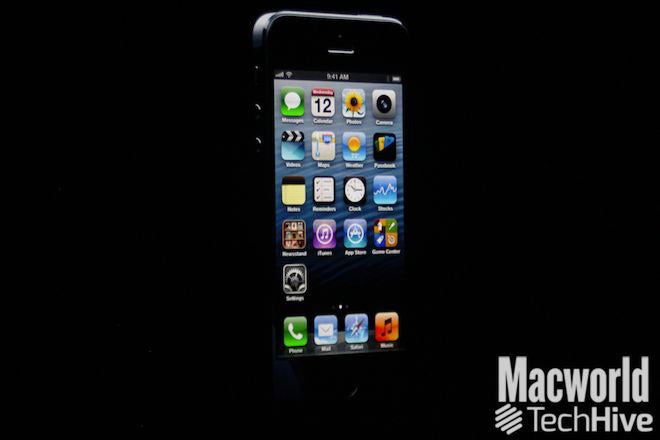
As was widely expected, Apple on Wednesday unveiled the iPhone 5, the newest entrant into its smartphone lineup. The iPhone 5 sports a taller screen, a new dock connector port, LTE support, and other refinements.
Phil Schiller, Apple’s senior vice president of worldwide marketing, took the wraps off the new iPhone for press gathered at the
company’s San Francisco event, calling the device “the most beautiful product we’ve ever made, bar none.”
The iPhone 5 is made entirely of glass and aluminum, Schiller said, adding that the “exacting level of standards” exhibited by the phone is Apple’s best hardware engineering to date.
It’s the thinnest and lightest iPhone, at 7.6mm thin, and 112 grams. Schiller said those measurements make it the world’s thinnest smartphone. The iPhone 5 is also volumetrically smaller than the iPhone 4S.
The screen
The iPhone 5 keeps the Retina display moniker, but it’s taller than the screens on iPhones that preceded it. The display offers 326 pixels per inch, with a 4-inch screen and 1136 x 640 resolution.
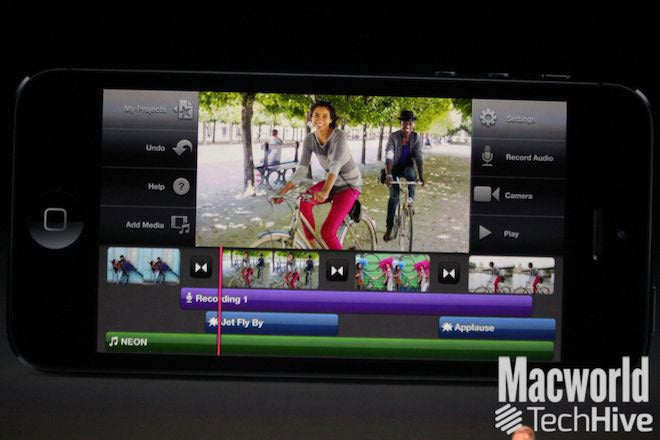
There’s now a fifth row of icons on the taller home screen, and all of Apple’s native apps, along with the iWork and iLife suites, have been updated on the iPhone 5 to take advantage of the larger display.
The Calendar app in landscape shows five days instead of three on the iPhone 5, for example.
Apps that aren’t updated don’t stretch or scale, Schiller said. Rather, such apps will display letterboxed on the iPhone, with black borders surrounding the centered app.
Schiller showed off apps from CNN and OpenTable, each of which had been updated for the taller iPhone display, adding in new content. In OpenTable’s case, Schiller said, the developers added some of the iPad app’s interface element, since the iPhone 5’s 4-inch screen afforded more space for such niceties.
The iPhone 5 offers 44 percent more color saturation than the iPhone 4S, Schiller said, and because the touch sensors are integrated right into the display, it’s 30 percent thinner, with sharper imagery, and less glare in sunlight.
Ultrafast wireless
New to the iPhone 5 is LTE, HSPA+, and DC-HSDPA support. That’s on top of the GPRS, EDGE, EV-DO, and HSPA that the iPhone 4S offered. Schiller said that with LTE, the iPhone 5 can achieve a “theoretical maximum downlink of up to 100Mbps.”
Schiller explained that the iPhone 5 uses one baseband chip for voice and data and a single radio chip. The new phone also improves upon the iPhone 4S’s dynamic antenna, Schiller said, improving its ability to automatically switch to different networks as appropriate.
LTE partners for the iPhone 5 include Sprint, AT&T, and Verizon in the U.S, and Rogers, Fido, Bell, Telus, and more in Canada. Schiller said there are “plenty” of LTE partners in Asia, Australia, the UK, and Germany, with lots of DC-HSDPA support in Europe as well.
The iPhone 5 also gains better Wi-Fi, with support for 802.11 a/b/g/n. The 802.11n standard is 2.4GHz and dual channel 5GHz, up to 150 Mbps, Schiller said.
A6 processor
The processor in the iPhone 5 is the brand new Apple A6, which is twice as fast at CPU and graphics processing compared to the A5 that drove the iPhone 4S, Schiller said. It’s also 22 percent smaller than its predecessor, freeing up more space inside the iPhone, and making it more energy efficient to boot. Schiller said that everything—launching apps, viewing attachments, loading music—would be twice as fast as before.
Schiller invited EA to show off what the A6 chip meant for them; EA debuted Real Racing 3, which included real-time reflections, functional rear view mirrors, and “console quality” graphics, according to EA Studios’s Rob Murray. (The game will hit the App Store later this year.)
The battery
Schiller explained that Apple wanted “to match the battery life of the 4S in a thinner and lighter design” for the iPhone 5. The company ended up exceeding that battery life; the iPhone 5 will offer eight hours of 3G talk time and browsing and LTE browsing, ten hours of Wi-Fi browsing, ten hours of video, 40 hours of music, and 225 hours of standby time.
The camera
The iPhone 5’s camera sports an eight megapixel sensor, 3264 by 2448 pixel images. It’s backside illuminated, with a hybrid IR filter, five-element lens, and a fast f/2.4 aperture. And the camera is 25 percent smaller than the iPhone 4S’s camera. The camera also includes a dynamic low-light mode, which can sense low light and combine elements for two f-stops greater.
The camera also includes, for the first time on an iPhone, a sapphire lens cover, which Schiller said would protect the lens and make images cleaner and sharper.
The A6 chip includes a new image signal processor, with spatial noise reduction and filtering to improve photographs. And the camera’s now 40 percent faster, too.
Also new in the iPhone 5’s camera arsenal is Panorama. You hold the iPhone vertically and sweep your scene; the app tells you at what speed to move. “Even if you’re not perfectly stable,” or if movement artifacts are introduced, Schiller said, the software can compensate in the final image.
Video performance is improved, too. The iPhone 5 offers 1080p HD video, improved video stabilization, face detection for up to ten faces, and can take photos while you’re recording video. The front-facing camera is now a FaceTime HD 720p HD camera with backside illumination, a significant improvement over the iPhone 4S’s VGA-quality front-facing camera.
Audio
The iPhone 5 includes three separate microphones, Schiller said: One on the front, one on the back, and one on the bottom. They improve noise cancellation and voice recognition.
The speaker gets improved, too. It now includes five magnets in its transducer, with better frequency response and better sound—while being 20 percent smaller than the speaker in the iPhone 4S. The earpiece is now noise-canceling, too, Schiller said.
With some carriers, the iPhone 5 will support wideband audio. In a typical cell phone call, the frequency of data in your voice is compressed around the midrange, Schiler said. But that doesn’t sounded entirely natural. Wideband audio fills up more of the frequency spectrum to make your voice sound more normal. Schiller said 20 carriers will support the technology at launch, and didn’t mention any U.S. carriers that would.
Lightning: The new dock connector port
Throw away your old dock connector cables. Or, at least, go pick up some adapters. The iPhone 5 abandons the familiar 30-pin dock connector port, which first appeared with the original iPod in 2003. In its place is a smaller port, which Apple calls Lightning.
The 8-signal Lightning connector is all-digital, with an adaptive interface and improved durability. It’s reversible (meaning you can orient it either way, like a MagSafe adapter), and it’s 80 percent smaller than the connector it replaces.
Schiller announced that Apple would offer a 30-pin-to-Lightning connector, but didn’t mention pricing.
The iPhone 5 will come in an all black model, and a white model with a bright silver aluminum finish.
We’ll have more on the iPhone 5, including pricing and availability, later on Wednesday as that information becomes available.
Source : pcworl.com
![LUMIA-620-1-jpg[1186083644].jpg](https://lh3.googleusercontent.com/blogger_img_proxy/AEn0k_tcE1liY10XgEdm7iYph3dduGDxBeEtLbzRTEeK6UhKp3BZFwWsJKAWI-Epoymp-z6EPQI_Hn1EW2-GeQlHHMcfrHHxAjnz0gdM_7TIqIJW69r-2sIFQAJTR2DOnokTj8vLyzSOzbZ0uXoM67spgy9w=s0-d)
![LUMIA-620-2-jpg[1186083644].jpg](https://lh3.googleusercontent.com/blogger_img_proxy/AEn0k_tR7mpKOV023VJKEygADvuoFivCXPWNFlNQyI6GN6PlLQM_H5plkDM5aDWBh94vhUCfDGZaCVKnl97mLQNTtHnTS2xWkOaoUj30lAb_8Ytfc16fG_ycm-9luZ8fCJSc6onrFKGKaa51s7xdDVGAWrZl=s0-d)

 My college-bound daughter, Emily, liked the usability and design of the Dell XPS 14.First of all, PCWorld is an excellent tool for researching laptops. Our laptop reviews give you an edge, helping you zero in on the models you should consider. You can sort the reviews by price, size, brand, and other features.
 The HP Envy 4 turned out to be a no-go because the touchpad buttons required a lot of force to press.